
GJ 197 EtherCAT Sensor: ESI Walkthrough and Setup
On EtherCAT, a 197 series magnetostrictive displacement sensor is not just a sensor: it is a slave described by an ESI file, with three 32-bit inputs, no output process data, and parameters that travel through the mailbox. The file fixes all of that, so reading it removes the guesswork from commissioning.
Every index and value below comes from the manufacturer file GJ 197 EtherCAT (1 magnet).xml, not from general practice.
The file in three layers
The header declares EtherCATInfo Version 1.6. Below it sit Vendor and Descriptions; the vendor block carries the manufacturer identity, the descriptions block carries the device itself.
| Item | Value in the ESI | Where it matters |
|---|---|---|
| Vendor Id | #x000005FC | how the master identifies the vendor |
| Device Type | ProductCode #x00000197 | how the master matches the ESI file |
| RevisionNo | #x1 | description revision, checked against firmware |
| Physics | YY | physical layer is EtherCAT |
| GroupType | GJ EtherCAT Sensor | grouping in the master device tree |
RevisionNo is the item most often skipped. Fit new firmware without the matching file and the master reports a mismatch; replace the file or switch that check off, but do not run past it.
Three inputs, nothing going down
The file holds a single TxPDO: #x1a00, named Sensor Inputs, mapped to SM3 and flagged Mandatory and Fixed, so entries cannot be removed or reordered.
| Index | Name | Data type | Meaning |
|---|---|---|---|
| #x6000:1 | Position 1 | DINT, 32 bit | position |
| #x6000:2 | Velocity 1 | DINT, 32 bit | velocity |
| #x6000:3 | Status 1 | DINT, 32 bit | status |
Three entries of 32 bits make 96 bits, 12 bytes, all upward. The file contains zero RxPDOs: there is no process data the master can write, no control word, no setpoint. Parameters can only travel through the mailbox, over CoE SDOs.
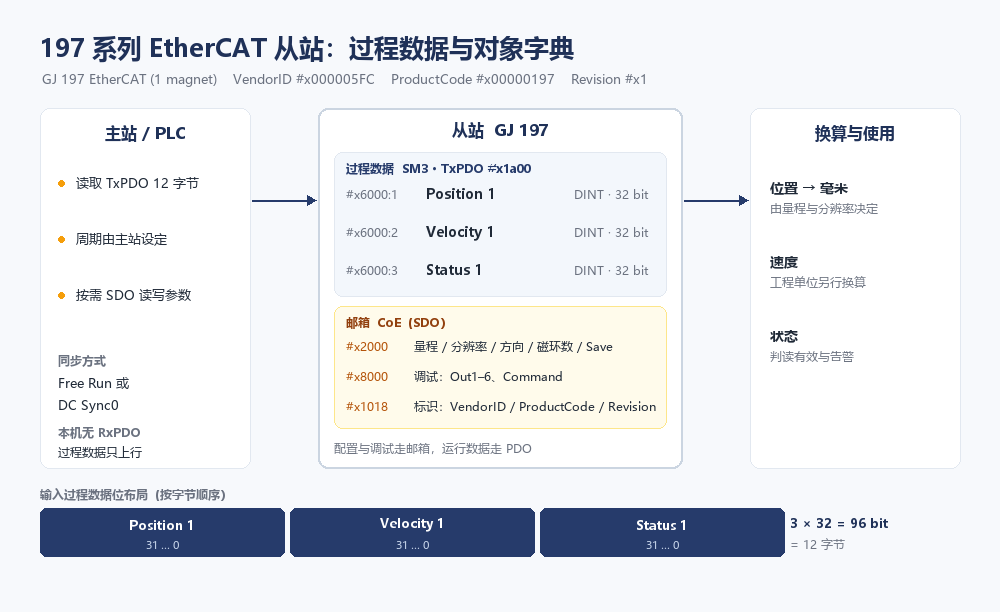
One detail raises eyebrows: SM3 declares a default size of 6 bytes while the three entries add up to 12. Most masters recompute the size from the PDO mapping and run fine; if yours reports a sync size mismatch, follow the 12 bytes of the PDO rather than trimming the mapping to fit 6.
Only #x2000 is really yours to set
The dictionary holds 17 objects. Fourteen are generic EtherCAT entries (device type, error register, identity, sync parameters, PDO assignment) that nobody touches on site. Three relate to the measurement: #x2000 parameters, #x6000 inputs and #x8000 debug.
| Sub-index | Name | Role |
|---|---|---|
| 1 | Stroke | measuring range |
| 2 | Resolution | resolution |
| 3 | Direction | increasing or decreasing reading |
| 4 | Max no of magnet | number of magnets fitted |
| 5 | No of missing magnet | missing magnet count |
| 6 / 7 | Reserved1 / Reserved2 | reserved |
| 8 | Save | commit to non-volatile memory |
Order matters: the first four entries, then Save. Without Save the values stay in RAM and revert at power-off, and with stroke and resolution both at 0000 the position cannot be converted to millimetres, which reads like a communication fault.
The ESI flags every one of these objects ro, which looks read-only. That flag is not the last word: whether a write is accepted depends on the firmware and the manual. The quick test is to write with an SDO and read straight back; if the original value comes back, the write went through.
Free Run or DC Sync0
The file offers two operating modes: Free Run (AssignActivate #x0000) and DistributedClk (#x0300, Sync0 event). Commission on Free Run to prove the link, then switch DC.
Once DC runs, watch #x1c32 and #x1c33, twelve sub-items each. The ones used on site are Synchronization Type, Cycle Time and Sync0 Cycle Time, plus three error counters: SM-Event Missed, Cycle Time Too Small and Sync Error. When those start counting, stop tuning the controller and reconcile the cycle time with master load.
Leave headroom as well: DC settles when sampling and when the master collects it, and does nothing for the sensor's own measurement delay. Add that separately when budgeting overall loop response.
#x8000 is the debug door
The debug object has eight sub-items: Out 1 to Out 6, Reserved and Command. Nothing like it exists in a generic EtherCAT device; it is vendor-specific, and the ESI gives names without semantics, so each Out needs the manual.
It still earns its place: when the device looks suspect, reading this group tells you roughly whether the problem sits in measurement or in communication, which saves pulling the sensor off the machine.
Six steps to running
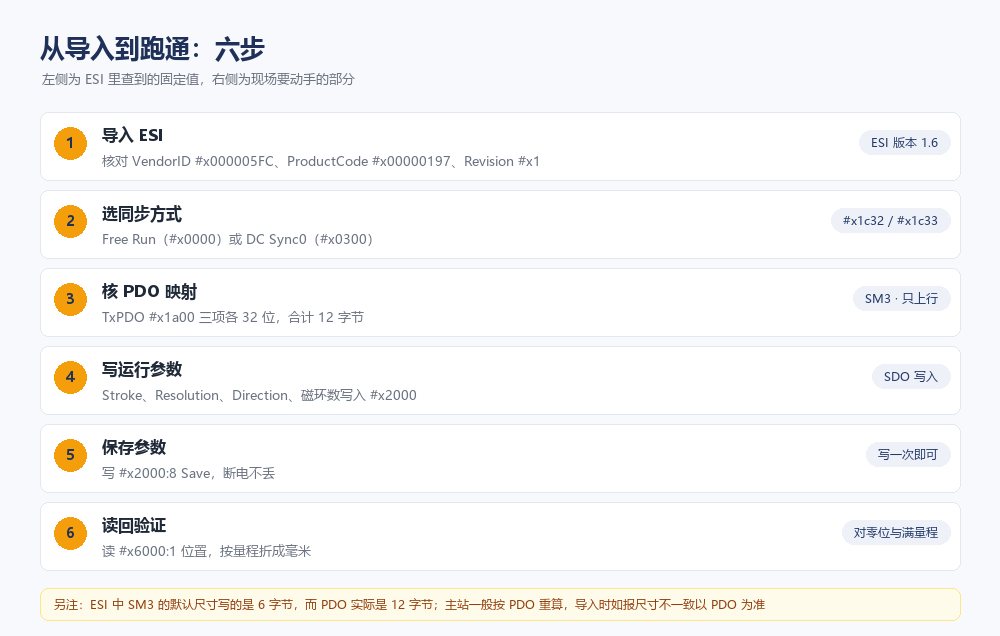
- Import the ESI and check identity. ProductCode #x00000197 and Revision #x1 both have to match.
- Choose the sync mode. Use DC Sync0 when available; prove the link on Free Run first.
- Check the PDO. Three 32-bit entries, 12 bytes, position before velocity before status.
- Write #x2000. Stroke from the real travel, resolution from the model, direction from how the cylinder faces, magnet count from what is fitted.
- Write #x2000:8 Save. Read back immediately and confirm nothing rolled over.
- Verify. Read #x6000:1, convert to millimetres with stroke and resolution, and check both ends against a steel rule.
Three traps
Trap one: the wrong ESI file. Both the file name and the device name carry (1 magnet); one series ships different ESIs for different magnet counts. Swap the configuration without swapping the file and communication may still come up, but the parameters tied to magnet count no longer line up: readings arrive, wrong ones.
Trap two: polling position over SDO. The mailbox is request and reply, so a handful of axes saturates the bus and the update rate drops. Position belongs in the PDO: #x1c13 (TxPDO assign) already defaults to #x011a, pointing at #x1a00. Do not delete that assignment.
Trap three: mistaking the SM default size for the data length. The 6-byte figure above is the example. Data length always follows the PDO mapping; the SM default is only a hint.
The ESI is the manufacturer's and stays as it is. What you control is how the master reads and writes. Get the three inputs right, set #x2000 and Save, and what remains is scaling and mechanical zeroing.
This is about the file. Wiring and bring-up order sit in ESI files and IN/OUT wiring direction, the sync and state-transition trade-off in DC configuration and the slave state machine. For whole-line selection see choosing between four buses, and the PROFINET sibling is GSDML setup on Series 199.
Frequently Asked Questions
Q: Why is there no output process data after importing the ESI
This ESI declares zero RxPDOs. The 197 series sends three 32-bit values upward (position, velocity, status) and accepts no process data, so the master output area stays empty. Parameters are written to the object dictionary over CoE SDOs.
Q: Why do the #x2000 settings revert after a power cycle
The Save step was missed. #x2000 has eight sub-items: write Stroke, Resolution, Direction and magnet count, then write #x2000:8 Save. Without Save the values stay in RAM and return to 0000 at power-off, leaving stroke and resolution at zero.
Q: The ESI says SM3 is 6 bytes but the PDO is 12, which do I follow
Follow the PDO and do not trim the mapping to reach 6. Three entries of 32 bits make 12 bytes, and most masters recompute the size from the mapping. If yours reports a sync size mismatch, treat the data length as 12 bytes; the SM default is only a hint.
Q: The master finds the device but parameters do not line up
Check whether the right ESI file was used. Both the file name and the device name carry (1 magnet), and one series ships a different file per magnet count. ProductCode is the same while the description differs, and the master uses RevisionNo to match. Change the file when the configuration changes.
Whatever the question above, it comes back to the same device.magnetostrictive displacement sensorThe product range lists every series by stroke, mounting style and output interface, which is the quickest way into a selection.
← Back to News