
PROFINET Position Sensor: GSDML Setup and Telegram Parsing
A 199 series magnetostrictive displacement sensor on PROFINET does not produce a reading just because the cable is plugged in. A few fields in the device description decide whether you get integer counts or millimetres, and whether commissioning passes first time. This covers only what configuration and parsing actually need; the interface details ship with the unit.
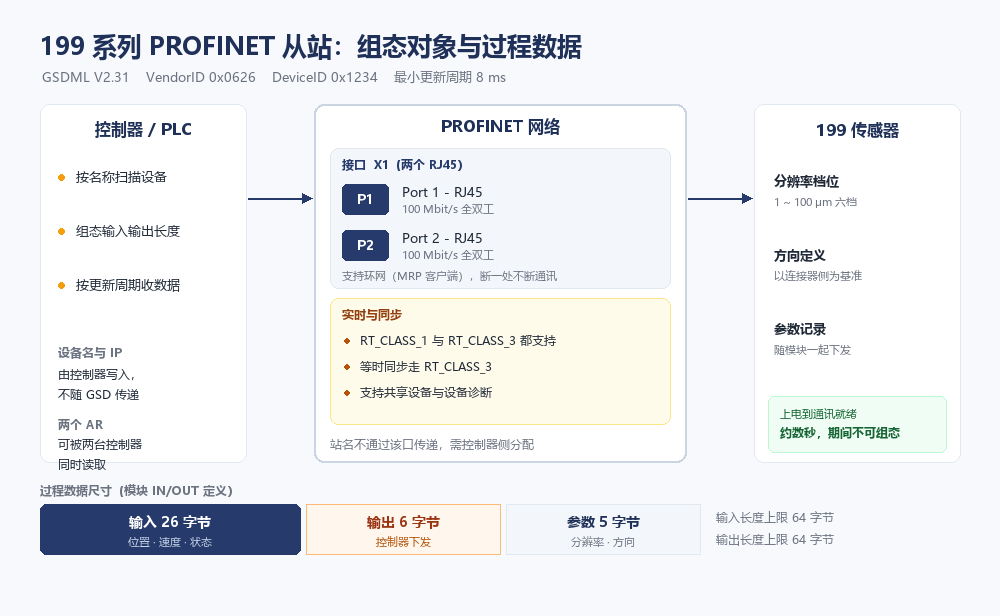
The fields that matter in the GSDML
The file runs to several hundred lines, but only these affect commissioning. Get any of them wrong and everything downstream is wasted effort.
| Field | Value in the file | What it does |
|---|---|---|
| Format version | V2.31 | Older versions cannot read it fully; the model goes missing |
| Vendor ID | 0x0626 | Places the device under a vendor in the catalogue |
| Device ID | 0x1234 | Combined with the vendor ID, identifies this model |
| Compatible name | GJ-position-sensor | The basis for the station name; you cannot invent one |
| Minimum interval | 8 ms | Hard floor for the update time |
| Input length | 26 bytes | Fixed by the module, not editable in the project |
| Output length | 6 bytes | Same |
| Length ceiling | 64 bytes each way | Total capacity if further modules are added |
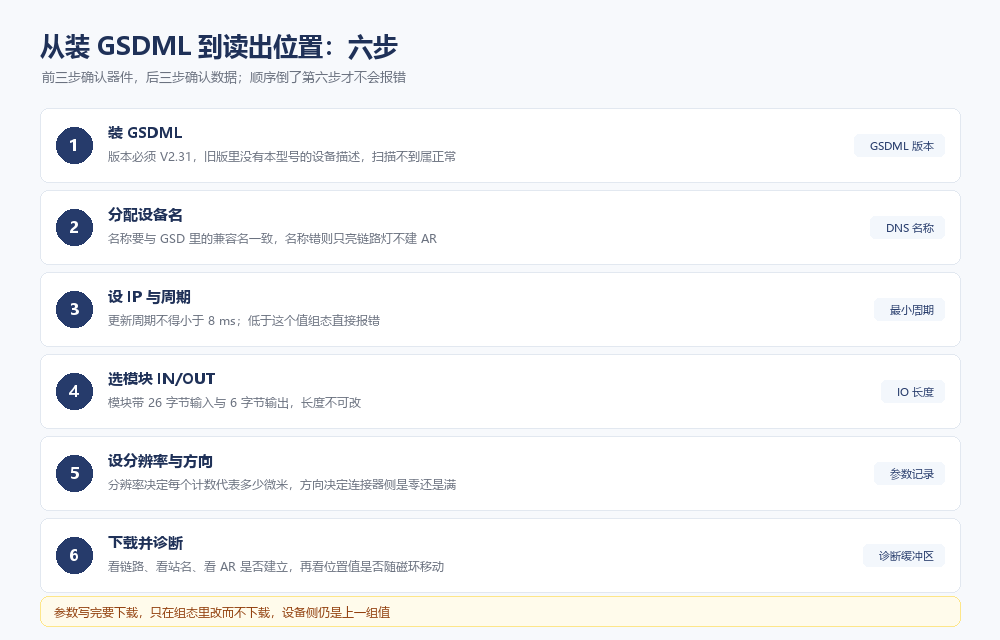
The version deserves its own note. The file is in V2.31 format. Installed into an older catalogue it will not raise an error, yet the model simply will not appear in the list, so a scan looks exactly like a device that is not powered.
Three things to get right straight after installing
Getting the file into the controller is only the start. If the station name, the IP and the update time do not line up, the application relation never comes up and everything after that is guesswork.
The station name must follow the compatible name in the file, not a convenient nickname. The symptom is unmistakable: the port link LED is on, so the physical layer is fine, yet the device never enters data exchange. That is the moment to look at the name, not at the patch cable.
The update time has a hard floor of 8 ms. Set 4 ms or 2 ms and the controller rejects it during configuration rather than failing later at runtime. The floor comes from the minimum device interval in the file and cannot be overridden; a faster cycle means a different communication approach, not a different setting.
One more point that is easy to miss: the file declares that the station name is not transferred over the port. The name can only be written by the controller, so swapping controllers means assigning it again.
Turning a 26-byte input into millimetres
The module input is 26 bytes and carries three groups: position, velocity and status. Position is an integer count, neither millimetres nor micrometres. To turn it into an engineering value you first need to know which resolution step the parameter record is set to.
There are six steps, each fixing how much length one count represents, and the velocity unit moves with it:
| Parameter value | One count equals | Velocity unit | 100,000 counts cover |
|---|---|---|---|
| 1000 | 1 um | 0.1 mm/s | 100 mm |
| 2000 | 2 um | 0.2 mm/s | 200 mm |
| 5000 | 5 um | 0.5 mm/s | 500 mm |
| 10000 | 10 um | 1.0 mm/s | 1 m |
| 50000 | 50 um | 5.0 mm/s | 5 m |
| 100000 | 100 um | 10.0 mm/s | 10 m |
There is one relation: millimetres equals counts times the resolution in micrometres, divided by 1000. At the 1 um step, 100,000 counts is 100 mm; at the 100 um step the same count is 10 m.
The longer the stroke, the coarser the step has to be, otherwise the count runs out of range. The opposite mistake is just as common: a 300 mm stroke left at 100 um makes one count equal 0.1 mm, and fine adjustment then feels like the sensor lacks resolution when the accuracy was thrown away in configuration.
A frequent false alarm: the resolution step is changed but the parameters are never downloaded, so the controller still converts with the old factor. The position value is correct; the conversion is not.
The direction bit: zero at the connector or full scale
The parameter record holds one direction bit with two values, stated plainly: 0 puts the minimum at the connector side, 1 puts the maximum there.
Keep this separate from the mounting direction. Turn the rod around mechanically and the reading reverses; change the parameter as well and the reversal cancels out. The number then looks perfectly normal while disagreeing with the datum marked on the drawing, which is the hardest kind of fault to trace. The cheaper habit on site is to leave the mechanics alone and change only this bit.
It must be downloaded afterwards. The parameter record is not pushed to the device on its own, so the screen shows the new value while the device still runs the previous one.
Two controllers reading one device
The file declares shared device support, allowing two application relations at once. The usual arrangement is closed-loop control on one and trend or interlocking on a supervisory or safety controller on the other.
Two cautions: each connection gets its own station name and IP and its own parameter download, so changing one does not update the other; removing one connection leaves the other running, but changing the station name drops both.
Six traps in the field
| Symptom | Likely cause | What to do |
|---|---|---|
| Device not found in a scan | File version too old, or the wrong model installed | Confirm V2.31, reinstall, rescan |
| Link LED on, no data exchange | Station name does not match the compatible name | Assign the name from the file; do not change the cable |
| Update time rejected in configuration | Interval set below 8 ms | Set 8 ms or more |
| Position is a large integer | No conversion by resolution | Convert using the step in the parameter record |
| Direction changed, reading unchanged | Parameters not downloaded | Download again, power-cycle if needed |
| Brief data loss when one ring path opens | Ring reconfiguration takes time | Normal behaviour; do not swap hardware |
On that last row: with one ring path open the link recovers on its own, but reconfiguration takes time and shows up as a short interruption. That is how a ring works. Treating it as a fault only leads to replacing parts that were never at fault.
The order differs from EtherCAT
Do not mix the two troubleshooting orders. On EtherCAT you check the process data mapping first; on PROFINET you check the station name and the update time first, because without them process data never arrives at all. Once that order is clear, the numbers inside the 26 bytes start to mean something.
If the reading moves but the direction or magnitude is wrong, resist blaming the sensor body. Check the resolution step and the direction bit in the parameter record first, and most of those calls end without a return shipment.
This covers file fields and telegram conversion. Device names and the RT versus IRT trade-off are in IRT and device name assignment on Series 199; port-level diagnosis after a dropout in PROFINET diagnostics; the first pass from scratch in PROFINET basics. Choosing between the two Ethernets is easier with the EtherCAT version on Series 197 and the PROFIBUS version on Series 195.
Frequently Asked Questions
Q: The GSDML is installed but the 199 series still will not appear in a scan
Check the file version first. The description is in V2.31 format; installed into an older catalogue it raises no error, yet the model does not appear, which looks identical to a device with no power. Once the version is right, check that the station name follows the compatible name. With a wrong name the link LED is still on, but the device never enters data exchange.
Q: The position value is an integer — how do I get millimetres
Look up the resolution step in the parameter record. At 1000 one count is 1 um; at 100000 one count is 100 um. Convert by multiplying counts by the resolution and dividing by 1000. After changing the step the parameters must be downloaded again, otherwise the controller keeps converting with the old factor and the reading is off by a fixed ratio.
Q: Can the update time go below 4 ms
No. The device description declares a minimum device interval of 8 ms, and setting 4 ms or 2 ms makes the controller reject the configuration outright rather than fail at runtime. The floor cannot be overridden; a faster refresh needs a different communication approach, not a different setting.
Q: Can two controllers read one 199 series unit at the same time
Yes. The file declares shared device support, so two application relations can exist at once. Each connection needs its own station name and IP and its own parameter download; changing one does not update the other. Removing one leaves the other running, but changing the station name drops both.
Whatever the question above, it comes back to the same device.magnetostrictive displacement sensorThe product range lists every series by stroke, mounting style and output interface, which is the quickest way into a selection.
← Back to News