
PROFIBUS Position Sensor: GSD File and Module Selection
The 195 series GSD runs to only 187 lines, far shorter than an EtherCAT or PROFINET description. Short does not mean simple: it contains hard limits on speed, on how many modules fit, and on how the bytes are arranged. None of them show up during configuration, and all of them cost time once the machine is on site.
What the file actually declares
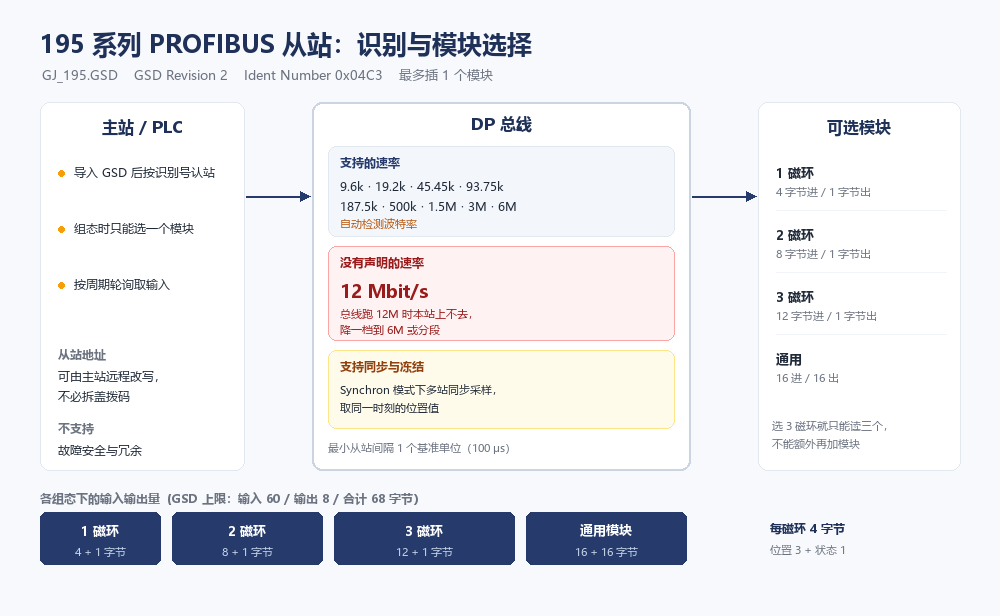
The header carries the identity, and the controller uses these entries to recognise the station and the model.
| Item | Value in the file | What it does |
|---|---|---|
| GSD revision | 2 | Older masters may not read it fully |
| Ident number | 0x04C3 | How the master files this model; must be unique on a mixed bus |
| Model name | GJ 195 series | The name shown in the catalogue |
| Order number | GJ_195 | Matches the label on the unit |
| Station type | DP slave | Not DP-V1, so diagnostics follow the standard slave path |
| Minimum slave interval | 1 base unit (100 us) | Floor for the poll cycle when sharing a bus |
| Input ceiling | 60 bytes | Most data one station can send |
| Output ceiling | 8 bytes | Most the master can write |
| Diagnostic length | 33 bytes | Length to read when pulling diagnostics |
One hard limit in the speed list
The file declares each supported rate individually: 9.6k, 19.2k, 45.45k, 93.75k, 187.5k, 500k, 1.5M, 3M and 6M, with automatic baud detection enabled.
There is no 12 Mbit/s. That matters because 12M is a common default on production lines: the master and the other slaves may all support it, and one station that does not declare it forces the whole segment down to 6M. Where cycle time is tight, that slows the master scan.
Two ways out. Confirm nothing on the bus needs 12M and set the network to 6M or below; or split the segment so this station sits on its own 6M run, with a repeater or gateway back to the main network. The second costs more and only earns its keep when 12M is a genuine requirement.
The file also declares support for the master writing the slave address remotely. Replacing a unit on site does not require opening the cover and setting the switches, which saves a cabinet entry.
One module slot, not several
The file allows a maximum of one module. The project takes a single module in a single slot; you cannot stack them the way some modular slaves allow.
| Module | Input | Output | Fits |
|---|---|---|---|
| 1 magnet | 4 bytes | 1 byte | Single position point |
| 2 magnets | 8 bytes | 1 byte | Two positions on one axis |
| 3 magnets | 12 bytes | 1 byte | Three points, long stroke or several stations |
| Generic | 16 bytes | 16 bytes | Where data has to go both ways |
Choosing three magnets gives 12 bytes in and 1 byte out, with no spare room for anything else. Work out how many position points are needed before ordering; adding a second function later means a different module and a fresh configuration.
Watch the output ceiling of 8 bytes. The generic module declares 16 bytes of output, which is above the per-station limit, so verify against what the master actually accepts rather than against the module definition alone.
Four bytes per magnet, four possible arrangements
Each magnet takes 4 bytes: three of position and one of status. The file offers four arrangements, presented as a drop-down in the configuration tool.
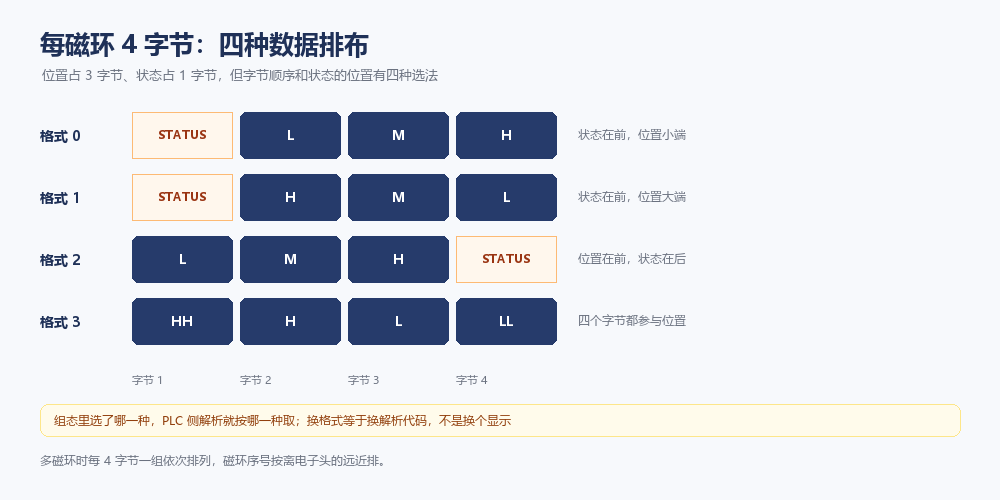
The four differ in exactly two things: which byte holds the status, and whether the position bytes run low-first or high-first. It looks like a formatting detail; on the PLC side it is the code that extracts the value.
Pick format 2 while the code still reads format 0 and the result is not a slightly wrong number: the status byte becomes part of the position, so the reading jumps to a wild value. It only jumps when the status changes, which makes it intermittent and therefore among the hardest faults to trace.
There is a quieter version of the same mistake. Change the format, download the parameters, and leave the extraction logic untouched. The sensor does exactly what it was told and the master still reads it wrong. Changing format means changing parsing code, not changing what is displayed.
With several magnets, each 4-byte group follows the previous one and the numbering runs from the electronics head outwards. Three magnets make 12 bytes, and the chosen arrangement applies to all three groups at once; you cannot mix formats within one station.
Three parameters that change the data structure
The user parameter block totals 10 bytes and six items are adjustable in the tool. Three of them do more than change a number.
Data format — the four arrangements above. Changing it changes how the bytes are read.
Measuring direction — Normal or Reverse. This is separate from how the rod is mounted. Turn the rod around and also set Reverse, and the two reversals cancel: the number looks perfectly normal while disagreeing with the datum on the drawing. The cheaper habit is to leave the mechanics alone and change only this setting.
Error handling — four options covering what the output does when a magnet is missing or a reading is invalid. You can zero a single position or all of them, and you can either zero or hold the old value. This affects safety logic more than it looks: zeroing presents a legitimate zero to the supervisory system, while holding the old value makes it look as though nothing moved. Either can be mistaken for a healthy signal, so decide how the supervisor detects faults before choosing.
The other three are numeric: resolution in six steps (5, 50, 100, 200, 500 and 1000 um), synchronisation (Unsynchron or Synchron), and measuring cycle (range 300 to 10000, default 2000).
Resolution follows stroke length. A few hundred millimetres at the 1000 um step makes one count equal a whole millimetre, and fine adjustment then feels like an inaccurate sensor when the accuracy was discarded during configuration. The opposite error is just as real: a ten-metre stroke on the 5 um step runs out of count range.
The file declares support for both synchronise and freeze modes. Use Synchron where several stations must sample the same instant; a single station is better left on Unsynchron, because synchronised operation expects the master to broadcast sync telegrams, and half-configured sync makes the refresh less stable, not more.
Traps seen on site
| Symptom | Likely cause | What to do |
|---|---|---|
| Station will not join a 12M bus | 12 Mbit/s is not declared | Drop the segment to 6M, or split it |
| Cannot add a second module | The limit is one module | Choose the module that fits and reconfigure |
| Reading occasionally jumps to a huge number | Format and extraction code disagree | Check the format and change the code too |
| Format changed, master still reads it wrong | Parameters downloaded, logic untouched | Change parameters and parsing together |
| Supervisor sees the carriage parked after a magnet is lost | Error handling set to hold the old value | Reselect based on how the supervisor detects faults |
| Refresh uneven with several stations | Synchron selected but no sync telegrams | Use Unsynchron for a single station, or complete the sync setup |
That last row deserves a note. Synchronised mode is not automatically better. It depends on the master broadcasting sync telegrams on time, and one slow slave on the bus is enough to break the cadence, which shows up as uneven refreshing. With a single position point to read, Unsynchron is both simpler and steadier.
In one line
A PROFIBUS GSD is short, but every declaration in it is a hard boundary: speed tops out at 6M, one module slot, four byte arrangements. Confirm those three at selection time and commissioning comes down to aligning parameters. Discover them on site instead, and the cost runs well past that of a different module.
This piece stays with the file itself. Whether an existing line should keep PROFIBUS is covered in Series 195 on an existing PROFIBUS line; importing the GSD and attaching the slave in GSD import and slave attachment; dropped stations in termination and segment isolation. Still comparing buses, the PROFINET version on Series 199 makes a useful contrast.
Frequently Asked Questions
Q: The bus runs at 12 Mbit/s — can a 195 series unit join it
No. The GSD declares each supported rate individually and stops at 6 Mbit/s; 12M is not among them. On a segment configured for 12M this station never enters data exchange. Either drop that segment to 6M or below, or run it separately at 6M and bridge back to the main network with a repeater or gateway.
Q: How are three magnet readings laid out in the input area
Each magnet takes a fixed 4 bytes, three of position and one of status, so three magnets make 12 bytes in sequence. Numbering runs from the electronics head outwards, the closest magnet being the first group. The chosen data format applies to all three groups at once; you cannot mix formats within one station.
Q: What happens if the data format is wrong
Not a slightly wrong number: the status byte gets treated as part of the position and the reading jumps to a wild value. It only jumps when the status changes, so it looks fine most of the time, which is what makes it hard to find. After changing the format the extraction code on the PLC must change too; downloading parameters alone leaves the master reading it wrong.
Q: What does the output become when a magnet is lost
It depends on the error handling setting, which has four options: zero a single position, zero all of them, or hold the old value. Zeroing presents a legitimate zero to the supervisor while holding the old value makes the position look unchanged, and either can pass for a healthy signal. Decide how the supervisor detects faults before choosing.
Whatever the question above, it comes back to the same device.magnetostrictive displacement sensorThe product range lists every series by stroke, mounting style and output interface, which is the quickest way into a selection.
← Back to News