PROFINET Displacement Sensor: Device Naming and RT/IRT Choice
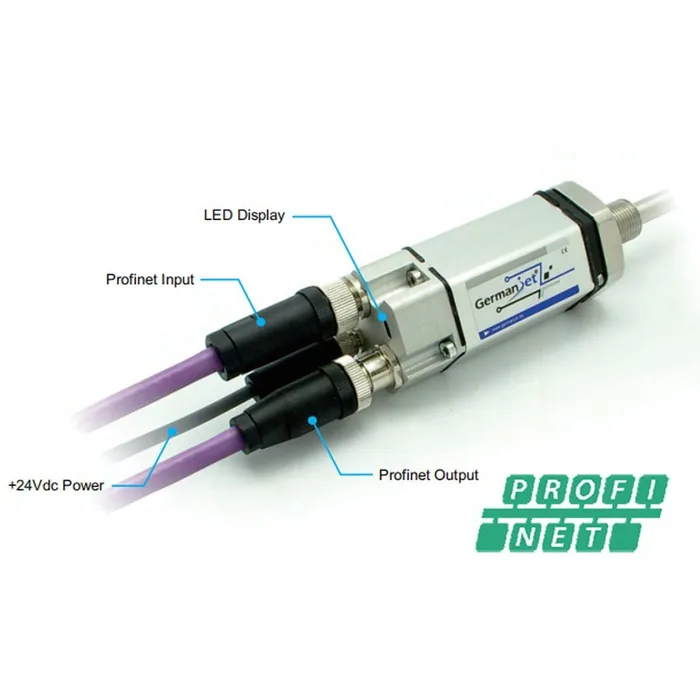
A PROFINET displacement sensor's identity is its device name, assigned before the controller downloads the IP. The point on which PROFINET differs most from other fieldbuses is this: a device's identity is its "device name", not a station address and not an IP address. At start-up the controller looks for devices on the network by the device names in the configuration, and only then downloads the preset IP to each. The first step when bringing a new device online is therefore not to set an IP, but to assign the device name. On that foundation, PROFINET offers two grades of real-time communication, RT and IRT (isochronous real-time); IRT achieves high-precision synchronisation by reserved time slots and locked topology. This article covers the 199PROFINET series; for a cross-protocol comparison see Comparing the Whole Fieldbus Range.
Device name: PROFINET's identity mechanism
Device-name assignment is completed at Layer 2 by DCP (Discovery and Configuration Protocol); the device does not need a correct IP in advance. The typical sequence is: scan the network in the engineering software → find the target device (identified by MAC address) → write the device name that matches the configuration → after the controller starts, it establishes the AR connection by name and downloads the IP.
Three engineering rules follow:
- The device name must match the configuration exactly, including case and separators. PROFINET device names must follow DNS naming rules (lowercase letters, digits, hyphens, dots); Chinese characters or underscores will be rejected.
- The device name must be unique on the same network. A duplicate name will cause the controller to connect to the wrong device, and the symptom is very well hidden — communication is healthy, but the data comes from another unit.
- A replacement device must have its device name reassigned. This is the basis of "device replacement without programming": if topology configuration is enabled, the controller can write the correct device name to the new device automatically from neighbour relationships, so the swap can be done without the engineering software. For the topology mechanism see PROFINET Diagnostics and Topology: What's Really Going On.
GSDML and module configuration
The slave description file for PROFINET is GSDML (XML format). Its role is the same as GSD for Profibus, but richer: it declares device identification, supported real-time classes, available modules and submodules, parameter items and diagnostic texts. The configuration steps are: install the GSDML → drag the device from the hardware catalogue → select the data module → set the device name and IP → set the update cycle → compile and download.
The position value of a displacement sensor is likewise transmitted as a 32-bit integer. What is read back is a count value; actual displacement = count value × resolution step, with the step chosen from 1 / 2 / 5 / 10 / 20 / 50 / 100 μm. The output is absolute position, so power-loss restart needs no homing; for the mechanism see Absolute vs. Incremental Position.
The difference between RT and IRT
| Dimension | RT (real-time) | IRT (isochronous real-time) |
|---|---|---|
| How it is implemented | Priority-tagged Layer 2 frames, bypassing the IP/TCP stack | Fixed time slots reserved within the cycle, hardware-scheduled |
| Cycle jitter | Present, affected by network load | Very small; slots are fixed |
| Topology requirement | Not locked; cables may be rearranged freely | Topology must be configured; wiring order is locked |
| Switch requirement | Ordinary industrial switches suffice | PROFINET switches that support IRT are required |
| Configuration complexity | Low | High; a sync domain and topology must be configured |
| Typical applications | Routine I/O, process-value acquisition | Multi-axis synchronous motion, isochronous sampling |
The engineering judgement is straightforward: use IRT only when the sample instants of the axes truly must be strictly aligned. RT suffices for reading position into PLC logic; IRT needs supporting switches and locks the topology, so any cable change then needs a re-download. IRT freezes the topology into the configuration, so any later cable change must be accompanied by a configuration change and a re-download; maintenance cost rises markedly. If the position value is merely being read for PLC logic, RT is usually sufficient.
How to set the update cycle
The PROFINET update cycle is set per device in the configuration. The hard constraint is the same as on other fieldbuses: the update cycle must not be shorter than the sensor's own update rate. Magnetostriction has to wait for the torsional wave to travel from the magnet back to the electronics head, so the longer the measuring range the longer a single measurement takes (of the order of 0.5 ms on shorter ranges, and several milliseconds on very long ranges). Setting the cycle too short merely causes repeated values to be read, and the controller's derivative term will compute a false velocity step. For how to match them see Matching Response Time and Refresh Rate to the Control Cycle.
Another point that is easily overlooked is watchdog time: PROFINET typically sets the watchdog as a multiple of the update cycle. An extremely short cycle also squeezes the watchdog very tight, so a slight network disturbance will trip a station fault. Cycle and watchdog should leave a reasonable margin.
Precautions when coexisting with IT networks
PROFINET runs on standard Ethernet, which is both an advantage and a source of risk. When real-time frames share the physical network with ordinary TCP/IP traffic, high-volume non-real-time traffic (camera images, file transfers, network-scanning tools) can crowd the bandwidth and cause RT communication jitter or even lost packets. The engineering practice is: separate the control network from the office/vision network with VLANs or independent physical segments, run only necessary traffic on the control network, and use industrial-grade switches rather than office switches. For a systematic approach to earthing and shielding see Troubleshooting Fieldbus Interference: Grounding, Shielding, Topology.
For matching master systems to protocols see Selection Guide: Which Fieldbus Does My PLC Support?; for product parameters and pin-outs see Series 199 PROFINET Explained; for general fieldbus connection practice see A Practical CANopen and EtherCAT Guide.
Practical tips for engineers
- IP65 means a 6.3 mm nozzle spraying water from any direction has no harmful effect; IP67 means no harmful ingress of water under immersion at 1 m depth.
- Contact-based sensors are typically only IP40/50, whereas non-contact magnetostrictive sensors can reach IP65 or even IP67 — for high dust and high humidity, choose the non-contact type.
Frequently Asked Questions
Q: What is the relationship between a PROFINET device name and an IP address?
The device name is the identity; the IP is the communication address. At start-up the controller looks for devices on the network by the device names in the configuration, and only then downloads the preset IP to each. The first step when bringing a new device online is therefore to assign the device name, not to set an IP.
Q: Why will a PROFINET device name not write?
Device names must follow DNS naming rules and may use only lowercase letters, digits, hyphens and dots; Chinese characters, uppercase letters or underscores will be rejected. The name must also be unique on the same network and must match what is entered in the configuration exactly.
Q: When is IRT needed rather than RT?
Use IRT only when the sample instants of the axes truly must be strictly aligned. IRT needs switches that support isochronous synchronisation and freezes the topology into the configuration, so any later cable change must be accompanied by a configuration change. When the position value is merely being read for PLC logic, RT is usually sufficient.
Q: Is a shorter PROFINET update cycle always better?
No. The cycle must not be shorter than the sensor's own update rate, otherwise repeated values will make the controller's derivative term compute a false velocity step; at the same time the watchdog is typically set as a multiple of the update cycle, so an overly short cycle squeezes the watchdog very tight and a slight network disturbance will nuisance-trip a station fault.
Q: Can PROFINET share a network with the office LAN?
It is not recommended. PROFINET runs on standard Ethernet; high-volume non-real-time traffic (camera images, file transfers, network scans) will crowd the bandwidth and cause real-time communication jitter or even lost packets. Isolate with VLANs or independent physical segments, and use industrial-grade switches.
Related Products
Related Applications
Multi-Industry Application Cases for Magnetostrictive Displacement Sensors
View Details
Series 19H Cylinder-Integrated Process Displacement Sensor Application Cases
View Details
Series 19P External Rod Process Displacement Sensor Application Cases
View Details