
Magnetostrictive Displacement Sensor Head LEDs: OK, No Magnet, Over-Range
On power-up, the head LEDs of a magnetostrictive displacement sensor tell you supply, magnet and range status before any meter is used. Read the electronics-head LEDs before unplugging. Analogue / SSI heads commonly have two lamps: green means the module is alive, red means the measuring condition is not met.
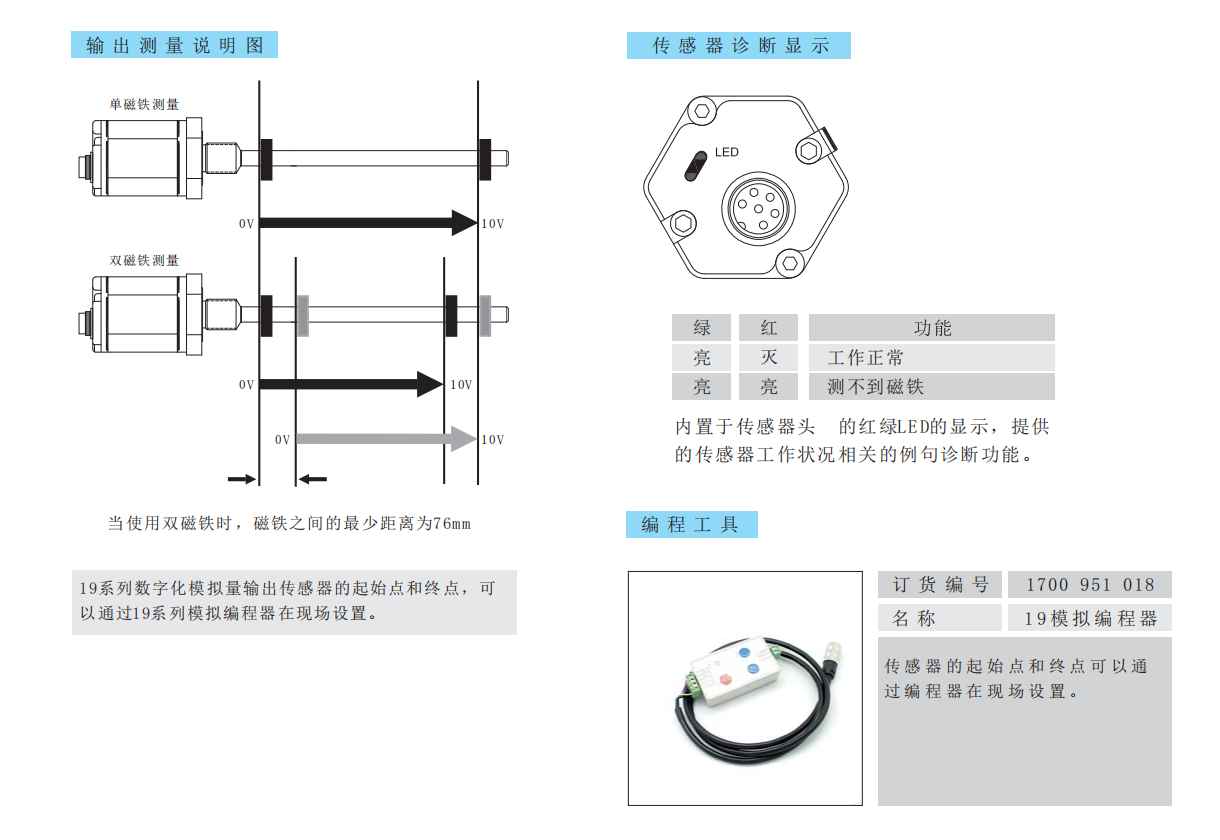
Lamp table
| Lamps | Meaning | Next |
|---|---|---|
| Green on, red off | OK, magnet seen | Align reading and stroke; do not chase a missing supply |
| Green on, red on | No magnet | Fallen / reversed magnet, air gap, or left the valid stroke (over-range) |
| Both off | No supply, or module dead | Measure +24 V; see troubleshooting and multimeter 5 steps |
Over-range and no-magnet often share the same lamps: the magnet entered a dead zone or left the rod. When both lamps are on, move the magnet to mid-stroke; if the lamps recover it was an over-range excursion, not a dead magnet. Lamps should return to green on / red off. If they stay dual-on at mid-stroke, it is the magnet or air gap.
With a multimeter
- Both off: measure 20.4–28.8 V, polarity and connector.
- Both on: move the magnet / piston before opening the head.
- Lamps OK but the reading jumps: routing, shield, ripple — n9.
SSI (162 / 192) uses the same lamps; protocol: 162 vs 192. Fieldbus link lamps: drop-outs.
Engineer's notes
- Fieldbus heads carry two sets of lamps. 194 (CANopen), 195 (Profibus DP), 197 / 198 (EtherCAT) and 199 (PROFINET) add a link lamp to the measuring lamps. A dropped node or lost frames is a link-lamp question first — measuring lamps being fine does not mean data reached the PLC.
- Lamps report measuring conditions, not accuracy. Green means there is an echo to read. Jitter and non-linearity do not show up on lamps; those go to routing, shielding and ripple.
- SSI uses the same lamp codes as analogue. 162 / 192 follow the table above; do not go looking for different lamp positions because the protocol changed.
Frequently Asked Questions
Q: Both lamps on — is the sensor dead?
Usually not. It means no magnet: fallen, reversed, air gap, or over-range / dead zone. Go to mid-stroke first.
Q: Lamps OK but the PLC has no value?
Supply and magnet are satisfied. Check output type, pin count, shield and PLC channel setup.
Q: Does Series 18 four-pin voltage use the same two lamps?
Follow that head's markings. Swapping supply and signal burns the sensor — do not rely on lamps alone.
Q: What if red flashes?
The usual spec is steady combinations for OK / no magnet. If you see flashing, check that type's note and confirm 20.4–28.8 V.
Related Products
Related Applications

Multi-Industry Application Cases for Magnetostrictive Displacement Sensors
View Details
Series 12 General-Purpose Magnetostrictive Displacement Sensor Application Cases
View Details
Series 16 Hydraulic Rod Magnetostrictive Displacement Sensor Application Cases
View Details