
CANopen Displacement Sensor: Changing Baud Rate, Node ID and Event Timer over SDO
Changing the baud rate, node address or event timer of a CANopen displacement sensor is done over SDO (Service Data Object), then saved to EEPROM so the sensor keeps the values after power-off. This article gives the complete flow for a Germanjet Series 19 CANopen displacement sensor — the object indexes to use, the order of writes, and what to do when the node goes silent after a change.
The three command sets here are for the Germanjet Series 19 model (194) — 0x2010 and 0x300B are vendor-specific objects in that series. Check another brand's manual first: node address and baud rate are not necessarily at those indices.
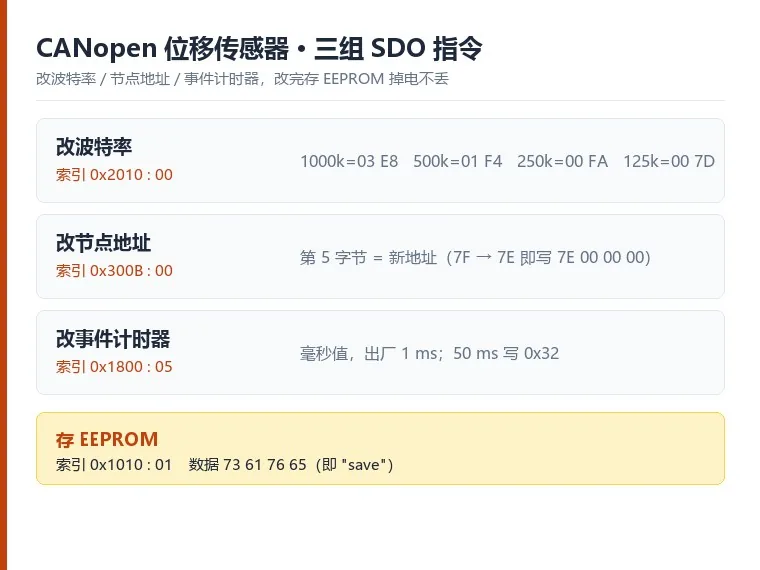
What SDO is used for here
PDO moves the position fast; SDO moves configuration — slow, confirmed, one parameter at a time. Every SDO write is acknowledged, so a failed write is visible immediately. You change three things over SDO in practice:
- Baud rate — must match the master before the node can talk.
- Node address (Node ID) — must be unique on the bus.
- CAN event timer — how often the sensor pushes its position without being asked (cyclic TPDO).
The write order that does not break the node
- Start the node (NMT operational) and confirm it answers SDO.
- Write the new value to the relevant object — do one parameter at a time.
- Store to EEPROM (store command) so the change survives power-off.
- Power-cycle or reset the node, then confirm the new value with a read-back SDO.
- Only after the read-back matches do you move on to the next parameter.
The actual SDO frames
Every parameter write follows the same pattern: the master sends one SDO write carrying the new value, the sensor acknowledges it, then a second SDO stores the value to EEPROM and the sensor acknowledges again. The store command is always identical — index 0x1010, sub-index 0x01, data 73 61 76 65, which is the four ASCII letters "save". A value that is not stored is lost at power-off and the sensor returns to its factory setting.
Baud rate — index 0x2010, sub-index 0x00, data = the new baud rate. 1000 kbps is written 03 E8, 500 kbps 01 F4, 250 kbps 00 FA and 125 kbps 00 7D. Data goes out low byte first, so the complete frame for 1000 kbps is 2F 10 20 00 E8 03 00 00. Only those four values are accepted — a number outside the table puts the sensor into fault. After a baud change the master's CAN settings must be changed with it; if the two sides disagree the node stays unreachable.
Node address — index 0x300B, sub-index 0x00, and the fifth data byte is the new address. To move the default 0x7F to 0x7E the frame is 2F 0B 30 00 7E 00 00 00. One trap here: after the address changes, the COB-ID of the store-to-EEPROM SDO must be calculated from the new address — 0x600 + 0x7E = 0x67E, not the old 0x67F, or the store command never arrives.
CAN event timer — index 0x1800, sub-index 0x05, data in milliseconds. The factory default is 1 ms; for 50 ms write 0x32 (50 decimal), giving 2F 00 18 05 32 00 00 00. A longer timer lowers bus load, a shorter one updates position faster — choose by the refresh rate the machine needs.
COB-IDs follow two rules: an SDO request is 0x600 + node address, and the sensor's response is 0x580 + node address. At node address 0x7F the request is 0x67F and the response 0x5FE. With those rules you can derive the pair for any address.
A useful trick when the current node address is unknown: power-cycle the sensor and it emits one EMCY frame — subtract 0x80 from that frame's COB-ID to get the node address. An EMCY at 0xFF, for instance, means node 0x7F.
What to do when the node goes silent
- You changed the baud first → the master still speaks the old baud. Reset the master to the new baud, then search the node.
- You changed the node ID → the old ID no longer answers. Set the master to the new ID (or scan the bus).
- Nothing answers at all → check the 24 V supply and the termination resistors at both cable ends before suspecting the sensor.
The frames you need on first start — EMCY, node start, PDO and SYNC — are explained in CANopen communication examples. For a PLC integration with an EDS file and terminal wiring, see connecting a digital CANbus module to a PLC.
Command byte variants, factory reset and LSS
The store command has two accepted forms.Both appear in the published material: 2F 10 10 01 73 61 76 65 and 23 10 10 01 73 61 76 65. Object 0x1010 sub 1 is declared 32-bit, so 0x23 is the canonical choice; the 0x2F form declares one valid byte and the device accepts it as well. Pick one and hard-code it — installations where saving keeps failing are usually alternating between the two.
Factory reset lives in 0x1011 sub 1: write the signature 6C 6F 61 64 ("load"), full frame 23 11 10 01 6C 6F 61 64. This covers a node address changed to an unknown value, a wrong baud rate, or an event timer set to zero that stopped all traffic — none of it needs a return to factory service.
- After a reset the node returns to 127 and the baud rate returns to the ordered value. Move the master's settings at the same time or the "recovery" ends in a complete loss of contact.
- The reset is not stored automatically; send the 0x1010 save afterwards if the restored state has to survive a power cycle.
When the node address itself is unknown, SDO has no entry point. Use LSS instead: 0x7E5 and 0x7E4 do not change with the node, so the four identity values — vendor, product code, revision, serial number — can locate the device, read its node, and change address or baud rate. CANopen master implementation covers that flow and how it differs from inferring the node from EMCY.
Practical rules
- Write one parameter, store, reboot, read back. Never change three objects in one session without confirming each.
- Keep the event timer above one measurement cycle; a timer that is too short floods the bus.
- Record the original values before changing them — the sensor stores what you write, and restoring a lost address without documentation means a full reset.
Those three sets of frames cover most "will not connect" cases on site. Store to EEPROM first, then power-cycle and read the value back — the change is only closed once the new value is live.
Frequently Asked Questions
Q: I changed the baud and the node disappeared. Why?
The master still speaks the old baud. Reset the master to the new baud and rescan the bus before touching the sensor.
Q: Do I have to save to EEPROM after every change?
Yes. A value that is not stored to EEPROM is lost at power-off. Write one parameter, store, reboot, read back.
Q: After changing the node address, what else has to change in the master
Three things: the receive COB-ID, the acceptance filter, and the target address for subsequent SDOs. Change the device alone and the symptom is losing contact immediately after saving.
Q: Does saving to EEPROM wear out if I do it often
Not during normal commissioning, but do not put the save into a power-up routine. Change, verify, then save once.
Related Products
Related Applications

Series 19D Split-Type Process Displacement Sensor Application Cases
View Details
Series 19F Flexible Process Displacement Sensor Application Cases
View Details
Series 19H Cylinder-Integrated Process Displacement Sensor Application Cases
View Details
Series 19P External Rod Process Displacement Sensor Application Cases
View DetailsWhatever the question above, it comes back to the same device.magnetostrictive displacement sensorThe product range lists every series by stroke, mounting style and output interface, which is the quickest way into a selection.
← Back to News